Streaming Devices Roku vs Apple TV vs Fire TV
Decide between Roku, Apple TV, and Fire TV for your streaming needs. Compare features, content libraries, and user interfaces.
Decide between Roku, Apple TV, and Fire TV for your streaming needs. Compare features, content libraries, and user interfaces.
Streaming Devices Roku vs Apple TV vs Fire TV The Ultimate Showdown
Hey there, fellow binge-watchers and cord-cutters! If you're anything like us, you've probably found yourself staring at a wall of streaming devices, wondering which one is the right fit for your entertainment cravings. It's a jungle out there, with new gadgets popping up all the time. But fear not, because today we're diving deep into the ultimate showdown: Roku vs. Apple TV vs. Fire TV. We're going to break down everything you need to know, from user interfaces to content libraries, special features, and even the nitty-gritty details like pricing and specific product recommendations. So, grab your popcorn, settle in, and let's figure out which streaming king deserves a spot in your living room!
Understanding Streaming Devices What They Are and Why You Need One
First things first, what exactly is a streaming device? In simple terms, it's a gadget that connects to your TV and allows you to stream content from the internet. Think of it as a bridge between your Wi-Fi and your big screen, bringing services like Netflix, Hulu, Disney+, YouTube, and countless others right to your fingertips. While many smart TVs have built-in streaming capabilities, dedicated streaming devices often offer a smoother experience, more apps, better performance, and regular updates. They can also breathe new life into an older, non-smart TV, saving you from buying a whole new set. For folks in the US and Southeast Asia, where streaming is booming, these devices are becoming essential for accessing a vast world of entertainment.
Roku The Everyman's Streaming Champion
Roku has been a household name in streaming for a long time, and for good reason. They're known for their simplicity, extensive app support, and a wide range of devices to fit every budget. If you're looking for an easy-to-use, no-fuss streaming experience, Roku is often the go-to choice.
Roku User Interface and Ease of Use
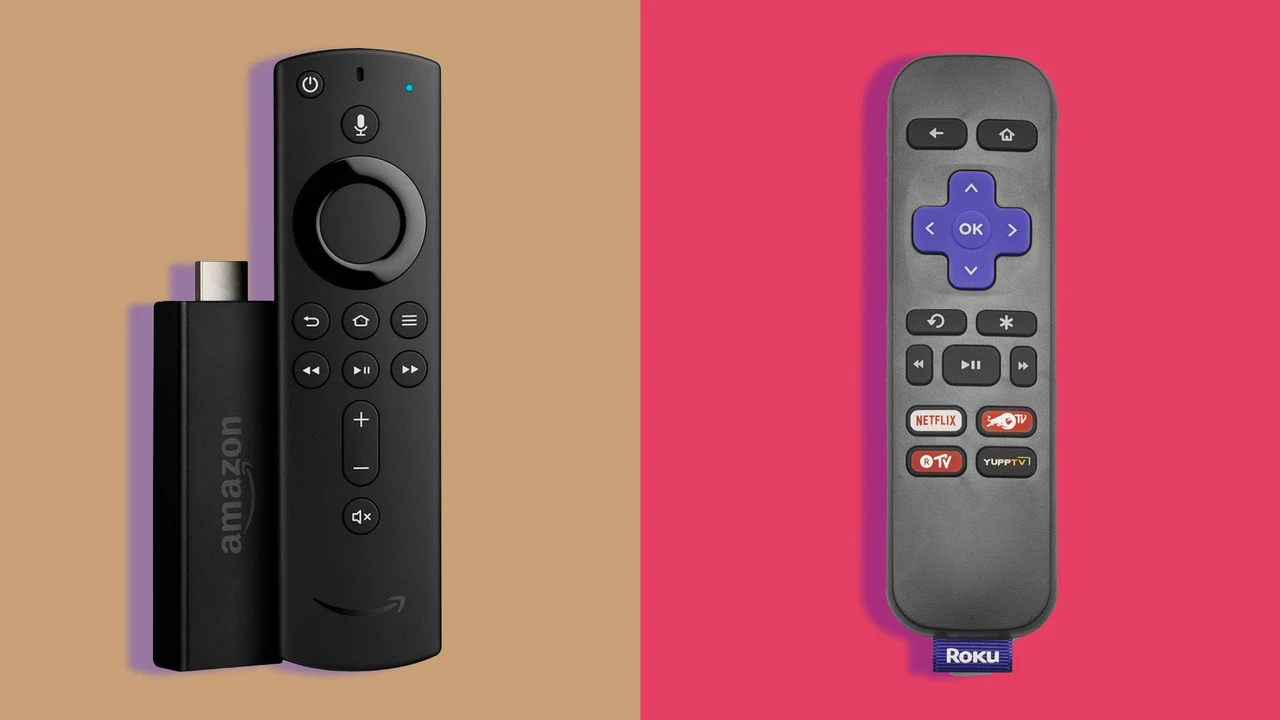
One of Roku's biggest strengths is its incredibly straightforward user interface. It's a grid of app icons, much like your smartphone's home screen, making it super easy to navigate. There's no complex menu system or hidden features to dig through. Just turn it on, and your favorite apps are right there. The remote is equally simple, usually featuring dedicated buttons for popular streaming services, which is a nice touch for quick access. This simplicity makes Roku a fantastic option for tech novices or anyone who just wants to get to their shows without a headache.
Roku Content Library and App Availability
When it comes to content, Roku boasts one of the most comprehensive app libraries out there. You'll find all the major players – Netflix, Hulu, Disney+, Amazon Prime Video, HBO Max, YouTube, Peacock, Paramount+, and countless others. Beyond the big names, Roku also offers a plethora of niche channels and free ad-supported streaming services like The Roku Channel, Pluto TV, and Tubi. This vast selection ensures you'll almost certainly find whatever you're looking for, whether it's the latest blockbuster or an obscure documentary.
Roku Special Features and Ecosystem
Roku devices often come with a few handy features. Many models include voice search on their remotes, allowing you to find content by speaking into it. Some higher-end Roku devices support 4K HDR streaming, ensuring you get the best possible picture quality. Roku also has its own ecosystem, including Roku TVs (smart TVs with Roku built-in) and Roku audio products, which can create a cohesive home entertainment experience. Their mobile app is also quite robust, allowing you to use your phone as a remote, cast content, and even listen privately through headphones.
Recommended Roku Products and Pricing
- Roku Express (Approx. $29.99 USD): This is Roku's entry-level device, perfect for basic HD streaming. It's incredibly affordable and gets the job done for casual viewers. Ideal for a secondary TV or for those on a tight budget.
- Roku Streaming Stick 4K (Approx. $49.99 USD): A fantastic mid-range option, offering 4K HDR streaming, a faster processor, and a voice remote. Its stick form factor makes it great for travel or discreet placement behind your TV. This is often considered the best value Roku device.
- Roku Ultra (Approx. $99.99 USD): The top-tier Roku experience. It features a more powerful processor, an Ethernet port for a stable wired connection, a lost remote finder, and often includes premium headphones for private listening. Best for power users or those with demanding home theater setups.
Use Case: Roku is excellent for families, budget-conscious consumers, or anyone who values simplicity and a vast selection of apps. If you're new to streaming or just want something that 'just works,' Roku is a strong contender.
Apple TV The Premium Experience for Apple Enthusiasts
If you're already deep into the Apple ecosystem with an iPhone, iPad, or Mac, then Apple TV might feel like a natural extension of your digital life. It's known for its sleek design, powerful hardware, and seamless integration with other Apple services.
Apple TV User Interface and Ease of Use
Apple TV's interface is clean, modern, and highly polished, reflecting Apple's signature design aesthetic. It features a row of app icons at the top, with recommendations and content previews below. Navigation is smooth and responsive, thanks to its powerful processor. The Siri Remote, while sometimes polarizing due to its touch surface, offers precise control and excellent voice search capabilities. For those accustomed to Apple's intuitive design, the learning curve is minimal.
Apple TV Content Library and App Availability
While Apple TV has access to all the major streaming apps like Netflix, Hulu, Disney+, and Amazon Prime Video, its strength lies in its integration with Apple's own services. This includes Apple TV+ (for exclusive Apple Originals), Apple Music, Apple Arcade (for gaming), and the iTunes Store for buying or renting movies and TV shows. It also supports AirPlay, allowing you to easily cast content from your Apple devices to your TV. The app store is robust, though perhaps not as sprawling as Roku's, focusing more on quality and popular services.
Apple TV Special Features and Ecosystem
Apple TV truly shines in its ecosystem integration. If you have other Apple devices, you'll appreciate features like HomeKit integration for smart home control, shared photo albums, and the ability to use your iPhone as a remote. It also supports multi-user profiles, personalized recommendations, and spatial audio with compatible AirPods. The hardware itself is top-notch, offering excellent performance for 4K HDR content and even some casual gaming through Apple Arcade. It's also a fantastic hub for smart home devices, especially if you're using Apple's HomeKit.
Recommended Apple TV Products and Pricing
- Apple TV 4K (3rd Generation) (Approx. $129 USD for 64GB, $149 USD for 128GB with Ethernet): This is the current flagship model. It offers blazing-fast performance, 4K HDR with Dolby Vision and HDR10+, and excellent audio support including Dolby Atmos. The 128GB model adds an Ethernet port and Thread networking support for smart home devices. It's a premium device with a premium price tag, but it delivers a premium experience.
Use Case: Apple TV is best suited for users already invested in the Apple ecosystem who value seamless integration, a polished user experience, and top-tier performance. It's also a great choice for those who want a robust smart home hub or enjoy casual gaming on their TV.
Fire TV Amazon's Smart Assistant Powered Streamer
Amazon's Fire TV lineup brings the power of Alexa and a strong focus on Amazon's own content to your living room. With a variety of devices, from sticks to cubes, Fire TV offers a compelling option, especially for Prime members.
Fire TV User Interface and Ease of Use
The Fire TV interface is more content-centric than Roku's, often prioritizing Amazon Prime Video content and recommendations. It features a main navigation bar with categories like Home, Live, Free, Movies, TV Shows, and Apps. While it can feel a bit more cluttered than Roku's simple grid, it's still relatively easy to navigate. The remote typically includes an Alexa voice button, making voice commands a central part of the experience. If you're a heavy Amazon user, you'll feel right at home.
Fire TV Content Library and App Availability
Like its competitors, Fire TV supports all the major streaming services. However, it heavily promotes Amazon Prime Video, Freevee (Amazon's free ad-supported service), and other Amazon-owned content. The app store is extensive, offering a wide array of streaming apps, games, and utilities. Alexa integration means you can easily search for content, launch apps, and even control smart home devices with your voice.
Fire TV Special Features and Ecosystem
The standout feature of Fire TV is its deep integration with Amazon's Alexa voice assistant. You can ask Alexa to find shows, play music, check the weather, control smart home devices, and even order products from Amazon, all from your TV. Many Fire TV devices also support 4K HDR, Dolby Vision, and Dolby Atmos for an immersive viewing experience. If you have other Alexa-enabled devices, Fire TV can become a central hub for your smart home. Some models also offer live TV integration with services like Sling TV or YouTube TV.
Recommended Fire TV Products and Pricing
- Amazon Fire TV Stick Lite (Approx. $29.99 USD): Amazon's most affordable option, offering HD streaming and an Alexa Voice Remote Lite. Great for basic streaming and those on a budget.
- Amazon Fire TV Stick 4K Max (Approx. $59.99 USD): This is a fantastic all-rounder. It supports 4K HDR, Wi-Fi 6, and has a faster processor than the standard 4K stick, making for a snappier experience. It also includes the Alexa Voice Remote with TV controls. Highly recommended for most users.
- Amazon Fire TV Cube (Approx. $139.99 USD): The most powerful Fire TV device. It combines a streaming player with an Echo Dot, meaning it has far-field microphones and can act as a full-fledged smart speaker even when your TV is off. It also features an Ethernet port and is incredibly fast. Best for power users, smart home enthusiasts, and those who want a hands-free Alexa experience.
Use Case: Fire TV is ideal for Amazon Prime members, users who frequently use Alexa, and those who want a streaming device that doubles as a smart home hub. If you enjoy voice control and Amazon's content ecosystem, Fire TV is a strong contender.
Head-to-Head Comparison Key Differences and Similarities
Now that we've looked at each player individually, let's put them side-by-side to highlight their core differences and what they have in common.
User Experience and Interface Comparison
- Roku: Simplest, most intuitive grid-based interface. Great for beginners and those who prefer minimal clutter.
- Apple TV: Polished, modern, and highly responsive. Best for Apple users who appreciate a premium feel and seamless integration.
- Fire TV: Content-forward, with a strong emphasis on Amazon's offerings. Alexa integration is central. Can feel a bit more promotional.
Content and App Ecosystem Comparison
- Roku: Widest range of apps, including many free ad-supported channels. Excellent for discovering new content.
- Apple TV: All major apps, plus deep integration with Apple TV+, Apple Music, and iTunes. Strong for those in the Apple ecosystem.
- Fire TV: All major apps, with heavy promotion of Amazon Prime Video and Freevee. Great for Prime members and Alexa users.
Performance and Hardware Comparison
- Roku: Generally good performance, especially on 4K models. Focuses on efficiency and affordability.
- Apple TV: Top-tier performance with powerful processors, ensuring smooth navigation and excellent 4K HDR playback.
- Fire TV: Performance varies by model, with the Fire TV Cube being the most powerful. Generally responsive, especially the Max and Cube models.
Smart Home Integration and Voice Assistant Comparison
- Roku: Basic voice search. Limited smart home integration, though some Roku TVs work with Google Assistant/Alexa.
- Apple TV: Excellent HomeKit integration, allowing control of smart home devices. Siri voice assistant.
- Fire TV: Deepest Alexa integration, acting as a smart speaker and controlling a vast array of smart home devices.
Pricing and Value Proposition
- Roku: Offers the best value across its range, with excellent performance at competitive prices.
- Apple TV: The most expensive option, but justifies its price with premium hardware, performance, and ecosystem integration.
- Fire TV: Very competitive pricing, especially for its stick models. Offers great value, particularly for Prime members.
Choosing Your Streaming Champion Factors to Consider
So, how do you pick the right one for you? It really boils down to a few key factors:
Your Existing Ecosystem and Devices
Are you an Apple loyalist with an iPhone, iPad, and HomePods? Then Apple TV will likely offer the most seamless experience. Do you have a house full of Echo devices and rely on Alexa for everything? Fire TV will fit right in. If you're platform-agnostic or just want something simple, Roku is a great choice.
Budget and Desired Features
How much are you willing to spend? Roku and Fire TV offer excellent budget-friendly options, while Apple TV sits at the premium end. Consider if you need 4K HDR, Dolby Vision, or advanced audio formats like Dolby Atmos. Do you want an Ethernet port for a more stable connection? These features can influence the price.
Ease of Use and User Interface Preference
Do you prefer a super simple, grid-based interface (Roku)? Or a more content-rich, recommendation-driven layout (Fire TV)? Perhaps a sleek, modern, and highly responsive design (Apple TV) is more your style. Think about who will be using the device and their tech comfort level.
Smart Home Integration Needs
If smart home control from your TV is a priority, then Fire TV with Alexa or Apple TV with HomeKit will be more appealing. Roku offers less in this department, focusing purely on streaming.
Gaming and Other Entertainment
While none of these are dedicated gaming consoles, Apple TV offers the best casual gaming experience through Apple Arcade. Fire TV also has some games, but Apple TV's gaming library is generally more robust. If you're just streaming movies and TV, this might not be a major concern.
Final Thoughts on Roku Apple TV and Fire TV
Ultimately, there's no single 'best' streaming device for everyone. Each platform brings its own strengths to the table, catering to different needs and preferences. Roku excels in simplicity and app variety, making it a fantastic choice for the average user or those on a budget. Apple TV offers a premium, integrated experience for Apple enthusiasts who value performance and a polished interface. Fire TV leverages the power of Alexa and Amazon's ecosystem, providing great value, especially for Prime members and smart home users.
Consider your current tech setup, your budget, and what features matter most to you. Whichever you choose, you're in for a treat, as all three platforms offer access to an incredible amount of entertainment. Happy streaming!
:max_bytes(150000):strip_icc()/277019-baked-pork-chops-with-cream-of-mushroom-soup-DDMFS-beauty-4x3-BG-7505-5762b731cf30447d9cbbbbbf387beafa.jpg)